
-
eSense Skin Response
-
- News
- Delivery contents Skin Response
- Technical Data
- All eSense in comparison
- Combination possibilities eSense sensors & Combined Feedback
- Example Measurements
- Analysis of eSense data (CSV)
- Streaming eSense data to a PC/Mac/Browser (eSense Web App, OSC, LSL)
- Duplicate eSense on a large screen (screen mirroring)
- Compatible Android and iOS devices
- Adapter for Android and Apple devices
- EC Declaration of Conformity
- Contact
-
- Functions of the Mindfield eSense App
- General notes
- Preparation and start of the app
- General view & Open Training
- Breath Pacer (optional)
- Biofeedback Snake
- Survey (optional)
- Pie charts (after a measurement)
- Procedure Overview
- Procedure editor
- Add new module
- Overview of the modules
- Creation of a procedure
- Meditations
- Own media (photos, videos and audios)
- Settings (Overview)
- In App Purchases
- Archive (overview)
- Archive (individual view)
- Marker feature
- Virtual Reality (VR) (f.i. Meta Quest 3)
- Compatible Android and iOS devices
- Adapter for Android and Apple devices
- Combination possibilities eSense sensors & Combined Feedback
- Privacy policy
- Apple Health and Health Connect
- Redeem a promo code
- Demo Mode and connection check
- The oscilloscope
- Threshold feedback
-
- All eSense at a glance
- Biofeedback with the eSense Skin Response
- Create Custom Procedures
- eSense App Cloud Functions
- eSense app demo
- eSense Web App
- How to use the eSense Skin Response (Requierements for devices, iOS&Android and troubleshooting)
- Individual media in iOS
- Biofeedback with eSense Sensors + App: Control Philips Hue Bulbs via Bluetooth
- Getting Started with eSense Skin Response - Setup, Electrodes & Troubleshooting
-
- Can I also use (Bluetooth®-)speakers instead of headphones with the eSense?
- Can I change the language in the app?
- How can I export the measurements?
- How do I use my own audio or video?
- Is the app available in dark mode?
- My eSense does not work with iOS 9 (or higher).
- My eSense is not working
- My procedures are not synchronized correctly.
- My smartphone / tablet has no more 3.5mm jack input, which adapter do I need?
- The app still displays strongly fluctuating or senseless values. Touching or releasing the sensors of the Skin Response or the Temperature does not make a difference.
- The values for the eSense Skin Response are very small (below 1.0 µS). What can I do to improve the quality of measurement?
- What is the purpose of the accounts and the cloud in the eSense app? Do I need an account?
- Which App do I need and where can I download it?
- Which electrodes are working with the eSense?
-
-
eSense Temperature
-
- News
- Delivery contents eSense Temperature
- Technical Data
- All eSense in comparison
- Combination possibilities eSense sensors & Combined Feedback
- Example Measurements
- Analysis of eSense data (CSV)
- Streaming eSense data to a PC/Mac/Browser (eSense Web App, OSC, LSL)
- Duplicate eSense on a large screen (screen mirroring)
- Compatible Android and iOS devices
- Adapter for Android and Apple devices
- EC Declaration of Conformity
- Contact
-
- Functions of the Mindfield eSense App
- General notes
- Preparation and start of the app
- General view & Open Training
- Breath Pacer
- Biofeedback Snake
- Survey (optional)
- Pie charts (after a measurement)
- Procedure Overview
- Procedure editor
- Add new module
- Overview of the modules
- Creation of a procedure
- Meditations
- Own media (photos, videos and audios)
- Settings (Overview)
- In App Purchases
- Archive (overview)
- Archiv (individual view)
- Marker feature
- Virtual Reality (VR) (f.i. Meta Quest 3)
- Compatible Android and iOS devices
- Adapter for Android and Apple devices
- Combination possibilities eSense sensors & Combined Feedback
- Privacy policy
- Apple Health and Health Connect
- Redeem a promo code
- Demo Mode and connection check
- The oscilloscope
- Threshold feedback
-
- Can I also use (Bluetooth®-)speakers instead of headphones with the eSense?
- Can I change the language in the app?
- How can I export the measurements?
- How do I use my own audio or video?
- Is the app available in dark mode?
- My eSense does not work with iOS 9 (or higher).
- My eSense is not working
- My procedures are not synchronized correctly.
- My smartphone / tablet has no more 3.5mm jack input, which adapter do I need?
- The app still displays strongly fluctuating or senseless values. Touching or releasing the sensors of the Skin Response or the Temperature does not make a difference.
- What is the purpose of the accounts and the cloud in the eSense app? Do I need an account?
- Which App do I need and where can I download it?
-
-
eSense Pulse
-
- News
- Delivery contents eSense Pulse
- Technical Data
- Example Measurements
- All eSense in comparison
- Comparison measurement eSense Pulse & Faros 180
- Combination possibilities eSense sensors & Combined Feedback
- Analysis of eSense data (CSV)
- Streaming eSense data to a PC/Mac/Browser (eSense Web App, OSC, LSL)
- Duplicate eSense on a large screen (screen mirroring)
- eSense Pulse & Bittium Faros 180 Comparison
- Compatible Android and iOS devices
- Troubleshooting connection problems
- EC Declaration of Conformity
- Contact
-
- Functions of the Mindfield eSense App
- General notes
- Preparation and start of the app
- General view & Open Training
- Breath Pacer
- Biofeedback Snake
- Spectrogram
- Survey (optional)
- Pie chart (after the measurement)
- Procedure Overview
- Procedure editor
- Add new module
- Overview of the modules
- Creation of a procedure
- Meditations
- Own media (photos, videos and audios)
- General settings
- In App Purchases
- eSense Pulse Analysis
- Explanation of the individual measured values
- Archive (overview)
- Archive (single view)
- Marker feature
- Virtual Reality (VR) (f.i. Meta Quest 3)
- Combination possibilities eSense sensors & Combined Feedback
- Compatible Android and iOS devices
- Troubleshooting connection problems
- Privacy policy
- Apple Health and Health Connect
- Redeem a promo code
- Demo Mode and connection check
- The oscilloscope
- Threshold feedback
- Polar H10 (alternative pulse sensor)
- Show all articles (4) Collapse Articles
-
- All eSense at a glance
- Create Custom Procedures
- eSense App Cloud Functions
- eSense app demo
- eSense Pulse Combined Feedback
- eSense Web App
- Individual media in iOS
- Mindfield Concept for Heart Rate Variability (HRV)
- Pulse - Heart Rate Variability
- Pulse biofeedback sensor for heart rate variability
- Biofeedback with eSense Sensors + App: Control Philips Hue Bulbs via Bluetooth
-
- Can I also use (Bluetooth®-)speakers instead of headphones with the eSense?
- Can I change the language in the app?
- How can I export the measurements?
- How do I use my own audio or video?
- Is the app available in dark mode?
- My eSense does not work with iOS 9 (or higher).
- My eSense is not working
- My procedures are not synchronized correctly.
- The app doesn’t find the eSense Pulse
- What battery belongs in the eSense Pulse?
- What is the purpose of the accounts and the cloud in the eSense app? Do I need an account?
- Which App do I need and where can I download it?
- Why are some parameters (e.g. SDNN, RMSSD, pNN50) a bit different in the eSense app than in the Kubios software?
-
-
eSense Respiration
-
- News
- Delivery contents eSense Respiration
- Example Measurements
- All eSense in comparison
- Combination possibilities eSense sensors & Combined Feedback
- Analysis of eSense data (CSV)
- Streaming eSense data to a PC/Mac/Browser (eSense Web App, OSC, LSL)
- Duplicate eSense on a large screen (screen mirroring)
- Compatible Android and iOS devices
- Adapter for Android and Apple devices
- Cleaning and Care
- Troubleshooting Measuring Signal and Breathing Belt
- EC Declaration of Conformity
- Contact
-
- Functions of the Mindfield eSense App
- General notes
- Preparation and start of the app
- General view & Open Training
- Breath Pacer
- Biofeedback Snake
- Survey (optional)
- Pie Chart (after the measurement)
- Procedure Overview
- Procedure editor
- Add new module
- Overview of the modules
- Creation of a procedure
- Meditations
- Own media (photos, videos and audios)
- General settings
- In App Purchases
- Archive (overview)
- Archive (single view)
- Marker feature
- Virtual Reality (VR) (f.i. Meta Quest 3)
- Compatible Android and iOS devices
- Adapter for Android and Apple devices
- Explanation of the Individual Measured Values
- Combination possibilities eSense sensors & Combined Feedback
- Privacy policy
- Apple Health and Health Connect
- Redeem a promo code
- Demo Mode and connection check
- The oscilloscope
- Threshold feedback
- Show all articles (1) Collapse Articles
-
- Can I also use (Bluetooth®-)speakers instead of headphones with the eSense?
- Can I change the language in the app?
- How can I export the measurements?
- How do I use my own audio or video?
- I do not get any (reasonable) measured values, what can I do?
- Is the app available in dark mode?
- My eSense does not work with iOS 9 (or higher).
- My eSense is not working
- My procedures are not synchronized correctly.
- My smartphone / tablet has no more 3.5mm jack input, which adapter do I need?
- What is the purpose of the accounts and the cloud in the eSense app? Do I need an account?
- Which App do I need and where can I download it?
-
-
eSense Muscle
-
- News
- Delivery contents eSense Muscle
- Note Pro and Home version
- Note on the Apps
- Technical Data
- All eSense in comparison
- Analysis of eSense data (CSV)
- Streaming eSense data to a PC/Mac/Browser (eSense Web App, OSC, LSL)
- Duplicate eSense on a large screen (screen mirroring)
- Battery Information
- Compatible Android and iOS devices
- Troubleshooting connection problems
- EC Declaration of Conformity
- Contact
-
- Articles coming soon
-
- Note on the Apps
- Notes before starting the eSense Mobile App
- Preparation and start of the eSense Mobile App
- General notes
- General view & Open Training
- Contraction Helper
- Survey (optional)
- Analysis (after the measurement)
- Procedure Overview
- Procedure editor
- Add new module
- Overview of the modules
- Creation of a procedure
- Meditations
- Own media (photos, videos and audios)
- General settings
- In App Purchases
- Archive (overview)
- Archive (single view)
- Marker feature
- Virtual Reality (VR) (f.i. Meta Quest 3)
- Compatible Android and iOS devices
- Privacy policy
- Apple Health and Health Connect
- Redeem a promo code
- Demo Mode and connection check
- The oscilloscope
- Threshold feedback
-
- eSense Muscle Demo (Short Version)
- eSense Muscle Demo (Long Version)
- Demo of the eSense Muscle Mobile App
- Demo of the eSense Muscle Web App
- Create Custom Procedures
- eSense App Cloud Functions
- eSense Muscle Web App with NVIDIA & ATI graphics card (Windows)
- Individual media in iOS
- eSense Muscle Web App Demo (Full Version)
- Muscle eSense Mobile App Demo
-
- Can I also use (Bluetooth®-)speakers instead of headphones with the eSense?
- Can I change the language in the app?
- How can I export the measurements?
- How do I use my own audio or video?
- Is the app available in dark mode?
- My eSense does not work with iOS 9 (or higher).
- My eSense is not working
- My procedures are not synchronized correctly.
- The app doesn’t find the eSense Muscle.
- What is the purpose of the accounts and the cloud in the eSense app? Do I need an account?
- Which App do I need and where can I download it?
-
< All Topics
Procedure Overview
Published
Updated
ByMindfield Biosystems
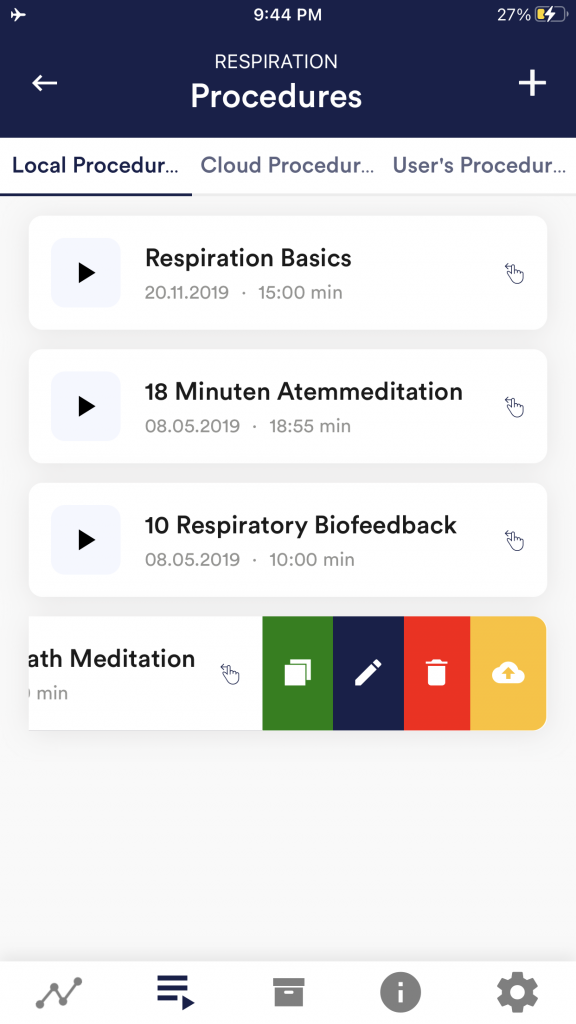
Edit or delete procedure
To edit a procedure, simply swipe it to the left in the overview.
You can then tap the blue pen-symbol to edit the module.
If you want to copy the procedure, tap on the green copy-symbol. By touching the red trash symbol, you can delete the module.
Sharing and transferring procedures (iOS ↔ Android)
Since version 8 of the eSense app, procedures can be downloaded, uploaded and shared reliably – including across platforms between iOS and Android. This way you can create a procedure on one device and continue using it on another device or pass it on to other users.
If the cross-device synchronisation via your cloud account does not work as expected, the article My procedures are not synchronised correctly will help.
Questions